---
title: Customise Dashboard and Reports
description: Learn how to use the Customise button to show or hide dashboard modules and reports, change their order, and choose whether they open by default.
---
[Skip to content](https://help.pasture.io/customise-dashboard-and-reports#main-content)
English
Show submenu for translations
[](https://pasture.io/)
Open main navigation
Close main navigation
- English
Show submenu for translations
How can we help you?
- There are no suggestions because the search field is empty.
1. [Help Center](https://help.pasture.io/?hsLang=en)
2. [Application Usage](https://help.pasture.io/application-usage?hsLang=en)
3. [Setting up your Farm](https://help.pasture.io/application-usage?hsLang=en#setting-up-your-farm)
# Customise Dashboard and Reports
## You can use the Customise button to choose what appears in your dashboard and reports view.
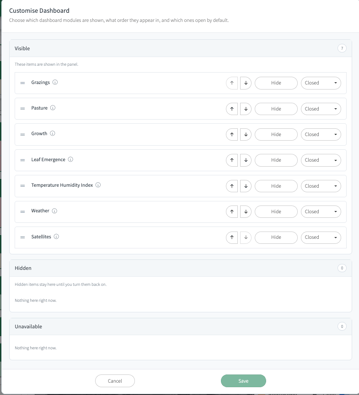
This lets you:
- show or hide items
- change the order they appear in
- choose whether they open expanded or closed by default
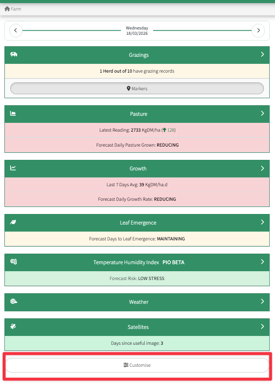
#### **Where to find the Dashboard Customise button:**
At the bottom of the dashboard screen.
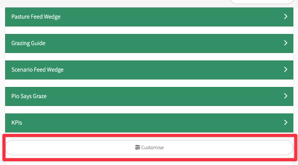
#### **Where to find the Reports Customise button:**
At the bottom of the Reports screen.
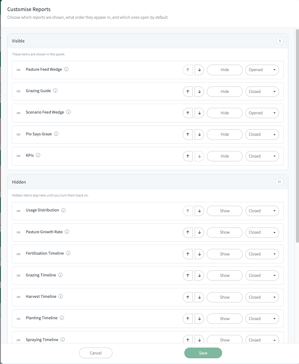
From there you can:
- move items up or down
- hide items you do not want to see
- show items that are currently hidden
- choose whether an item opens **Open** or **Closed** by default
Select **Save** to apply your changes.
#### **What the sections mean**
**Visible** These items are currently shown.
**Hidden** These items are available, but not currently shown.
**Unavailable** These items are not currently available for your account or setup.
#### **If you cannot find something**
If a module or report is missing, it may simply be hidden or moved.
Open **Customise** and check whether it is listed under **Hidden**.
- [Application Usage](https://help.pasture.io/application-usage?hsLang=en#main-content)
- [Paddock Settings and Details](https://help.pasture.io/application-usage?hsLang=en#paddock-settings-and-details)
- [FAQ](https://help.pasture.io/application-usage?hsLang=en#faq)
- [Farm Dashboard](https://help.pasture.io/application-usage?hsLang=en#farm-dashboard)
- [Grazing Planner](https://help.pasture.io/application-usage?hsLang=en#grazing-planner)
- [Setting up your Farm](https://help.pasture.io/application-usage?hsLang=en#setting-up-your-farm)
- [Mapping](https://help.pasture.io/application-usage?hsLang=en#mapping)
- [Web Browsers and Devices](https://help.pasture.io/application-usage?hsLang=en#web-browsers-and-devices)
- [Privacy, Security & Terms](https://help.pasture.io/privacy-security-terms?hsLang=en#main-content)
- [Policies & Terms](https://help.pasture.io/privacy-security-terms?hsLang=en#policies-terms)
- [Password & Login](https://help.pasture.io/privacy-security-terms?hsLang=en#password-login)
- [Getting Started & FAQ](https://help.pasture.io/getting-started-faq?hsLang=en#main-content)
- [Frequently Asked Questions](https://help.pasture.io/getting-started-faq?hsLang=en#frequently-asked-questions)
- [Manual Pasture Readings](https://help.pasture.io/manual-pasture-readings?hsLang=en#main-content)
- [Manual Pasture Readings](https://help.pasture.io/manual-pasture-readings?hsLang=en#manual-pasture-readings)
- [Plans and Pricing](https://help.pasture.io/plans-and-pricing?hsLang=en)
- [Pasture Readings](https://help.pasture.io/pasture-readings?hsLang=en#main-content)
- [Pasture Readings FAQ](https://help.pasture.io/pasture-readings?hsLang=en#pasture-readings-faq)
- [App Usage](https://help.pasture.io/pasture-readings?hsLang=en#app-usage)
- [Troubleshooting](https://help.pasture.io/pasture-readings?hsLang=en#troubleshooting)
- [V1 (Classic) Help Articles](https://help.pasture.io/v1-classic-help-articles?hsLang=en#main-content)
- [Pasture Readings](https://help.pasture.io/v1-classic-help-articles?hsLang=en#pasture-readings)
- [Paddock Activities](https://help.pasture.io/v1-classic-help-articles?hsLang=en#paddock-activities)
- [App Setup](https://help.pasture.io/v1-classic-help-articles?hsLang=en#app-setup)
- [Grazing Activity](https://help.pasture.io/v1-classic-help-articles?hsLang=en#grazing-activity)
- [Paddocks](https://help.pasture.io/paddocks?hsLang=en#main-content)
- [Harvests](https://help.pasture.io/paddocks?hsLang=en#harvests)
- [Fertilisations](https://help.pasture.io/paddocks?hsLang=en#fertilisations)
- [Paddock Details](https://help.pasture.io/paddocks?hsLang=en#paddock-details)
- [Plantings](https://help.pasture.io/paddocks?hsLang=en#plantings)
- [Spraying](https://help.pasture.io/paddocks?hsLang=en#spraying)
- [Overlay](https://help.pasture.io/paddocks?hsLang=en#overlay)
- [Grazings](https://help.pasture.io/paddocks?hsLang=en#grazings)
- [Livestock](https://help.pasture.io/livestock?hsLang=en#main-content)
- [Grazing](https://help.pasture.io/livestock?hsLang=en#grazing)
- [Herds](https://help.pasture.io/livestock?hsLang=en#herds)
- [People](https://help.pasture.io/people?hsLang=en#main-content)
- [Managing Users](https://help.pasture.io/people?hsLang=en#managing-users)
- [Task Manager](https://help.pasture.io/people?hsLang=en#task-manager)
- [Integrations](https://help.pasture.io/integrations?hsLang=en)
- [Feed](https://help.pasture.io/feed?hsLang=en#main-content)
- [Feedstuff](https://help.pasture.io/feed?hsLang=en#feedstuff)
- [Creating a Silo](https://help.pasture.io/feed?hsLang=en#creating-a-silo)
- [Feed Inventory](https://help.pasture.io/feed?hsLang=en#feed-inventory)
- [How to Add Feed and Nutrition to a Grazing](https://help.pasture.io/feed?hsLang=en#how-to-add-feed-and-nutrition-to-a-grazing)
- [How to Create a Detailed Grazing](https://help.pasture.io/feed?hsLang=en#how-to-create-a-detailed-grazing)
[](https://pasture.io)
HQ in Hobart, Tasmania, Australia - servicing farmers worldwide.
[mailto:support@pasture.io](mailto:support@pasture.io)
Copyright © 2025, Pasture.io Pty Ltd