
From your home screen, select "Herds" and “View All”
Click on the green button to the top right which says “New Herd”
A new window will appear on the left of the screen
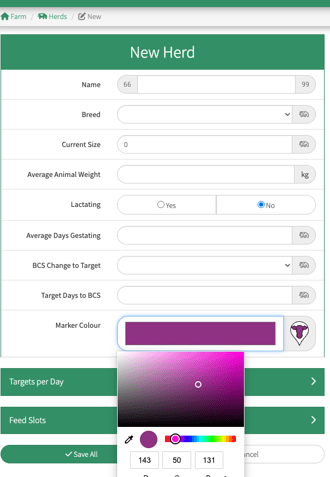
Fill in these fields with the New Herd details:
-
Name - Enter the name to identify the herd
-
Breed - Select from the Drop Down Box
-
Current Size – Enter the herd size at the time of creating.
This can be adjusted up or down as the herd changes. See Help Centre Article Editing Herd Numbers
-
Animal Average Weight - The average weight of your animals
-
Lactating - Select whether the herd is lactating or dry
-
Average Days Gestating, BCS Change to Target, Target Days to BCS - You are welcome to skip these fields
-
Marker Colour - Select the preferred colour and shade from the palette option which appears by clicking on the colour bar by the cow’s head. This is handy for identifying the herd on the maps
Targets Per day
-
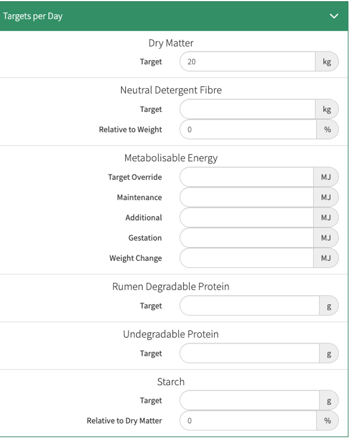
Target - Enter the target dry matter per animal per day.
-
Nutrient Values - Enter the nutrient requirements per animal per day.(These can be skipped if you do not require this information)
More information on these values can be found on the Help Centre Feed and Livestock Nutrition Metrics
Feed Slots
By default, there is one feed slot.
-
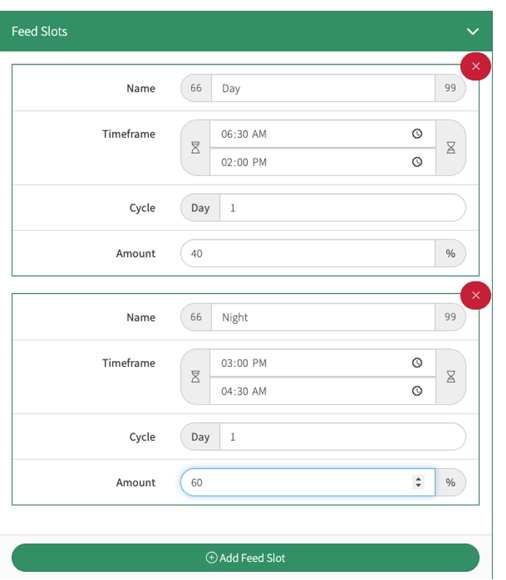
Name - Give your feed slot a name, this could be something like “Day” or “Night”, or “24hr”
-
Time Frame - This refers to the time that the herd enters and leaves the paddock
- Cycle - Leave this as '1' for 24 hour feed slots, or twice a day grazing. For more complex, or 16 hour grazing please view this link How to 16 hour Graze
-
Amount - The target percentage of dry matter that the herd will be consuming in each feed slot.
In this example, the herd may eat 40% of their dry matter target in the Day Feed Slot and 60% of their dry matter target in the Night Feed Slot
-
Add Feed Slot - You can add as many feed slot as you need. Simply click on the tab and repeat the feed slot instructions above
- Allocate the paddocks to the herd - Select or deselect paddocks from the map or paddock list which your herd will be using over the year. This will help you with reporting and filtering on reports
-
Save All

Once you have created your herd, you are now ready to your grazings
Video Article How to Set up Herds and Feed Slots