
To create a task
-
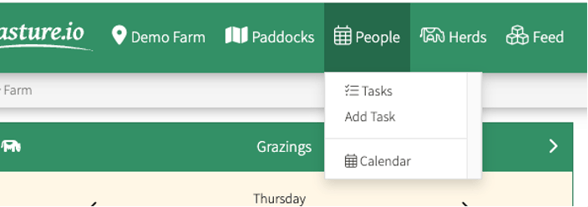
Go to the People Tab at the top of your Screen
-
Select Add Task
-
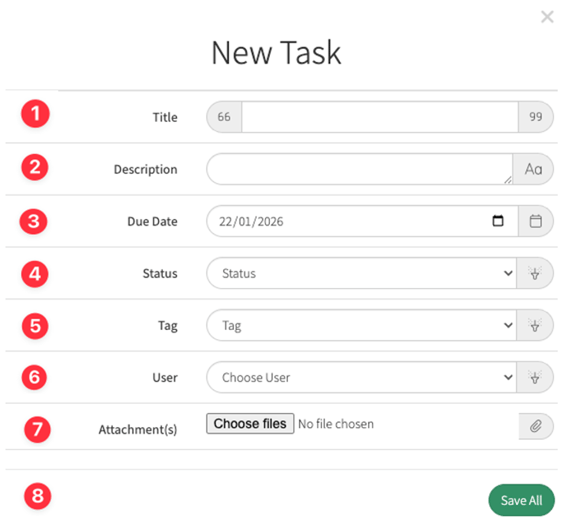
You can add the task and details to the New Task window from here
-
Title: Give the task a short and informative title. For example, "Fix the boundary fence", "Vehicle Maintenance", "Drench", etc.
-
Description: Provide as much detail in the description to successfully complete the task.
-
Due Date: Set a due date to make sure everything is going to plan.
-
Status: Is the status of the task In Progress or Not Started? Set the status to keep everyone up-to-date.
-
Tag: Set a priority by tagging the task with Low Priority or High Priority to keep people focussed on the most important tasks
-
User: Assign or delegate someone responsible for the task.
-
Attachments(s): Take a photo, or attach a file like a PDF or a Spreadsheet to the task so you can provide farm staff, consultants, and contractors with the information they need to complete the task.
-
Save All
To Assign a Task to a paddock please follow the tutorial on the link Adding Tasks from the map, list or charts
As with Paddock activities lists, there is a list for Tasks.
-
Go to People and select the Tasks list
-
Here you will see you list of tasks and status information
-
All the headers on this list are active and you can select your preferred view. by clcking at the top of the column.
In this example, the status header has been selected
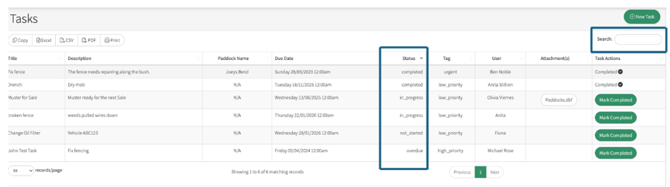
If you are unable to find the task, use the Search option found to the right above the Tasks Action Column
You can also use the Search option to filter for specific tasks ie all your vehicle maintenance, or drench etc
The report can be copied, saved in Excel, CSV and PDF formats or printed off