---
title: Individual Paddock History
description: You can view the paddock activity history of a chosen paddock. This may be helpful for circumstances such as a decision to fertilise a paddock a certain number of days after it is grazed.
---
[Skip to content](https://help.pasture.io/individual-paddock-history#main-content)
English
Show submenu for translations
[](https://pasture.io/)
Open main navigation
Close main navigation
- English
Show submenu for translations
How can we help you?
- There are no suggestions because the search field is empty.
1. [Help Center](https://help.pasture.io/?hsLang=en)
2. [Paddocks](https://help.pasture.io/paddocks?hsLang=en)
3. [Paddock Details](https://help.pasture.io/paddocks?hsLang=en#paddock-details)
# Individual Paddock History
## You can view the paddock activity history of a chosen paddock. This may be helpful for circumstances such as a decision to fertilise a paddock a certain number of days after it is grazed.
1\. Select the chosen paddock from the map.
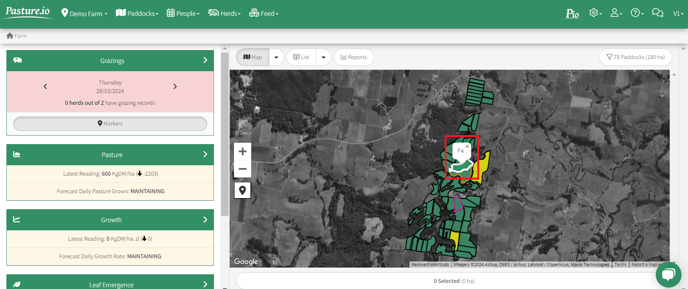
2\. Click the white button **Show More Details**.
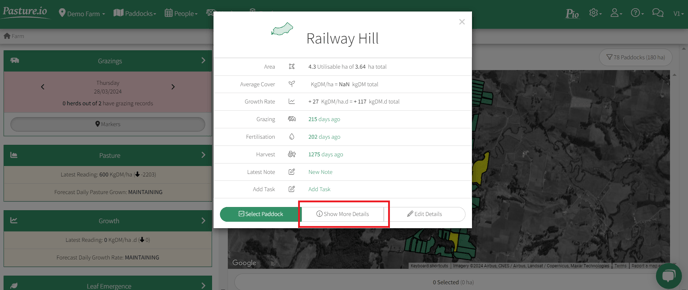
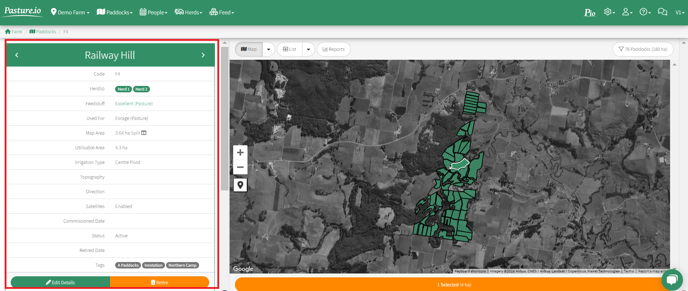
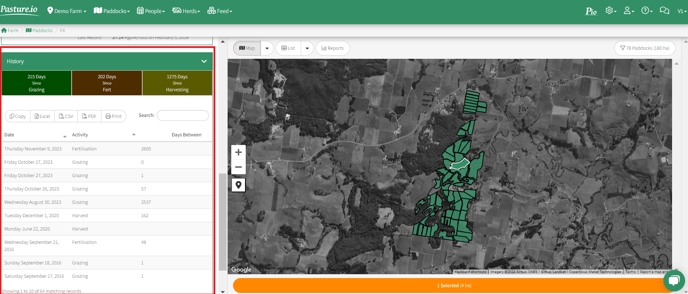
3\. Firstly, you will see some summary details of the chosen paddock on the left-hand side. You need to scroll down to view the paddock activity history.
4\. Under the green **History** menu, you can see a short summary of the most recent history of activities on the chosen paddock. In this example, we can see that the last grazing was 215 days ago, last fertilisation was 202 days ago and the last harvest was 1275 days ago.
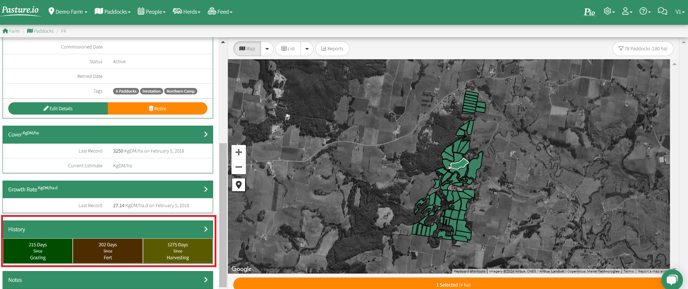
5\. Click the green **History** menu. This will open up below a complete list of of the paddock's activities by date. The list is exportable and downloadable.
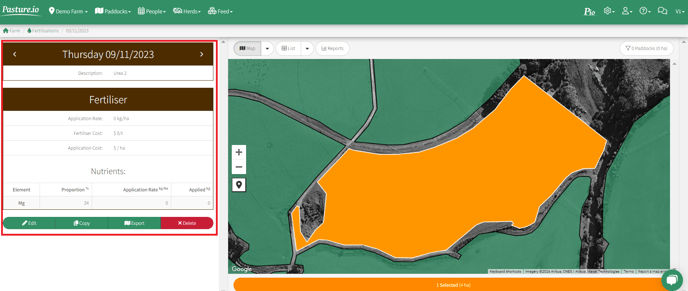
6\. You can click on any of the paddock activity records in the list to open up the details of that particular record. This example shows further details of the fertilisation activity that occurred on 9 November 2023.
- [Application Usage](https://help.pasture.io/application-usage?hsLang=en#main-content)
- [Paddock Settings and Details](https://help.pasture.io/application-usage?hsLang=en#paddock-settings-and-details)
- [FAQ](https://help.pasture.io/application-usage?hsLang=en#faq)
- [Farm Dashboard](https://help.pasture.io/application-usage?hsLang=en#farm-dashboard)
- [Grazing Planner](https://help.pasture.io/application-usage?hsLang=en#grazing-planner)
- [Setting up your Farm](https://help.pasture.io/application-usage?hsLang=en#setting-up-your-farm)
- [Mapping](https://help.pasture.io/application-usage?hsLang=en#mapping)
- [Web Browsers and Devices](https://help.pasture.io/application-usage?hsLang=en#web-browsers-and-devices)
- [Privacy, Security & Terms](https://help.pasture.io/privacy-security-terms?hsLang=en#main-content)
- [Policies & Terms](https://help.pasture.io/privacy-security-terms?hsLang=en#policies-terms)
- [Password & Login](https://help.pasture.io/privacy-security-terms?hsLang=en#password-login)
- [Getting Started & FAQ](https://help.pasture.io/getting-started-faq?hsLang=en#main-content)
- [Frequently Asked Questions](https://help.pasture.io/getting-started-faq?hsLang=en#frequently-asked-questions)
- [Manual Pasture Readings](https://help.pasture.io/manual-pasture-readings?hsLang=en#main-content)
- [Manual Pasture Readings](https://help.pasture.io/manual-pasture-readings?hsLang=en#manual-pasture-readings)
- [Plans and Pricing](https://help.pasture.io/plans-and-pricing?hsLang=en)
- [Pasture Readings](https://help.pasture.io/pasture-readings?hsLang=en#main-content)
- [Pasture Readings FAQ](https://help.pasture.io/pasture-readings?hsLang=en#pasture-readings-faq)
- [App Usage](https://help.pasture.io/pasture-readings?hsLang=en#app-usage)
- [Troubleshooting](https://help.pasture.io/pasture-readings?hsLang=en#troubleshooting)
- [V1 (Classic) Help Articles](https://help.pasture.io/v1-classic-help-articles?hsLang=en#main-content)
- [Pasture Readings](https://help.pasture.io/v1-classic-help-articles?hsLang=en#pasture-readings)
- [Paddock Activities](https://help.pasture.io/v1-classic-help-articles?hsLang=en#paddock-activities)
- [App Setup](https://help.pasture.io/v1-classic-help-articles?hsLang=en#app-setup)
- [Grazing Activity](https://help.pasture.io/v1-classic-help-articles?hsLang=en#grazing-activity)
- [Paddocks](https://help.pasture.io/paddocks?hsLang=en#main-content)
- [Harvests](https://help.pasture.io/paddocks?hsLang=en#harvests)
- [Fertilisations](https://help.pasture.io/paddocks?hsLang=en#fertilisations)
- [Paddock Details](https://help.pasture.io/paddocks?hsLang=en#paddock-details)
- [Plantings](https://help.pasture.io/paddocks?hsLang=en#plantings)
- [Spraying](https://help.pasture.io/paddocks?hsLang=en#spraying)
- [Overlay](https://help.pasture.io/paddocks?hsLang=en#overlay)
- [Livestock](https://help.pasture.io/livestock?hsLang=en#main-content)
- [Grazing](https://help.pasture.io/livestock?hsLang=en#grazing)
- [Herds](https://help.pasture.io/livestock?hsLang=en#herds)
- [People](https://help.pasture.io/people?hsLang=en#main-content)
- [Managing Users](https://help.pasture.io/people?hsLang=en#managing-users)
- [Task Manager](https://help.pasture.io/people?hsLang=en#task-manager)
- [Integrations](https://help.pasture.io/integrations?hsLang=en)
- [Feed](https://help.pasture.io/feed?hsLang=en#main-content)
- [Feedstuff](https://help.pasture.io/feed?hsLang=en#feedstuff)
- [Creating a Silo](https://help.pasture.io/feed?hsLang=en#creating-a-silo)
- [Feed Inventory](https://help.pasture.io/feed?hsLang=en#feed-inventory)
- [How to Add Feed and Nutrition to a Grazing](https://help.pasture.io/feed?hsLang=en#how-to-add-feed-and-nutrition-to-a-grazing)
- [How to Create a Detailed Grazing](https://help.pasture.io/feed?hsLang=en#how-to-create-a-detailed-grazing)
[](https://pasture.io)
HQ in Hobart, Tasmania, Australia - servicing farmers worldwide.
[mailto:support@pasture.io](mailto:support@pasture.io)
Copyright © 2025, Pasture.io Pty Ltd