
To select a single paddock:
From the Map or List
-
Select the paddock
-
Select Edit Details
-
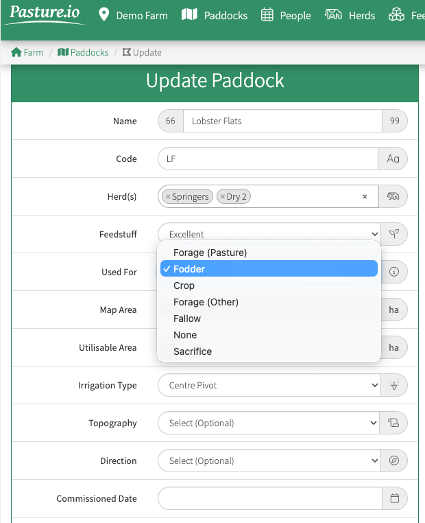
Select “Used For” in the window now showing to the left of your screen
-
Select Fodder
-
Save All
To select Multiple Paddocks
From the Map or List.
-
Select the paddocks you are locking up for silage (to select more than one paddock hold the Shift key while left clicking with the mouse)
-
Click on the Orange Action Bar at the bottom of your screen
-
Select Bulk Edit
-
Select “Used For” in the window now showing to the left of your screen
-
Select Fodder
-
Save All
By selecting the “Fodder”, the satellites will automatically be disabled
The paddock(s) will appear in black on the Map and List when the Cover overlay is selected
The paddock(s) will be excluded from the Feed Wedge
When you are ready to return the paddocks to the feeding rotation, follow the steps above and change the "Used For" option back to "Forage(Pasture)"
How to Record a Harvest Activity
How to forward plan surplus paddocks for harvesting silage or hay