---
title: Pio Says Graze — Your next paddocks, right now
description: Pio Says Graze helps you quickly identify which paddocks are ready to graze, using pasture cover, rest period, and targets to prioritise grazing decisions.
---
[Skip to content](https://help.pasture.io/pio-says-graze#main-content)
English
Show submenu for translations
[](https://pasture.io/)
Open main navigation
Close main navigation
- English
Show submenu for translations
How can we help you?
- There are no suggestions because the search field is empty.
1. [Help Center](https://help.pasture.io/?hsLang=en)
2. [Application Usage](https://help.pasture.io/application-usage?hsLang=en)
3. [Farm Dashboard](https://help.pasture.io/application-usage?hsLang=en#farm-dashboard)
# Pio Says Graze — Your next paddocks, right now
## Pio Says Graze helps you quickly see which paddocks are the best to graze by combining pasture cover and rest period, based on your monthly targets, into a simple, easy-to-use ranking.
### What is it?
Pio Says Graze helps you quickly identify the paddocks that are most ready to graze.
It brings together the key signals you already use on farm, pasture cover, time since grazing or harvest, and feed available, and turns them into a clear priority order.
It does not replace your judgement. It simply saves time and helps highlight the most obvious next grazing options.
---
### Where you’ll see it
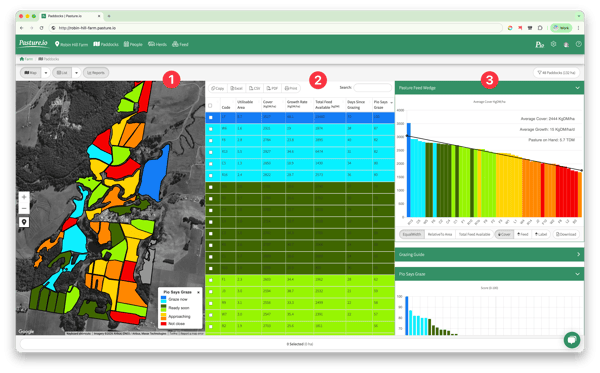
#### You can use Pio Says Graze in three places:
**1. List view**
- A dedicated column in the paddock list, visible by default.
- Sort by this column to see the highest-priority paddocks first.
**2. Map overlay**
- Select *Pio Says Graze* from the overlay dropdown.
- Paddocks are coloured by grazing priority.
**3. Reports panel**
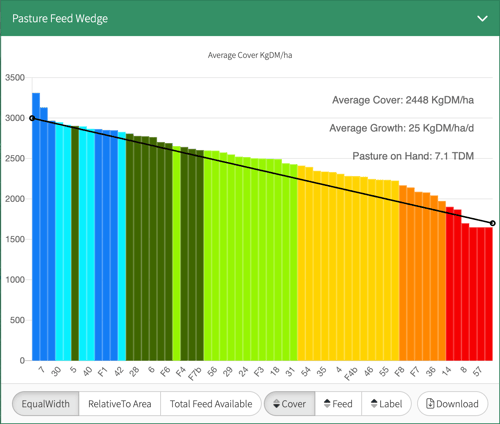
- A bar chart panel appears under *Grazing Guide*.
- Paddocks are ranked from highest to lowest priority.
---
### How to read the colours
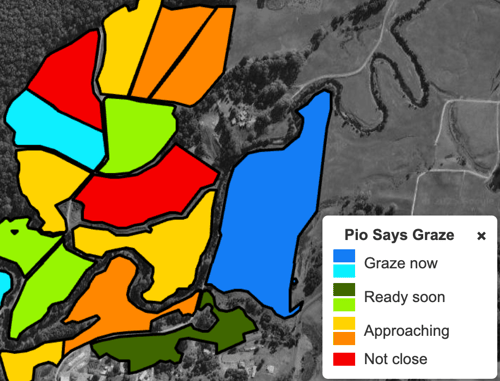
Paddocks are grouped into simple priority ranges:
- **Graze now** (blue)
- **Ready soon** (green)
- **Approaching** (yellow/orange)
- **Not close** (red)
If a paddock has no valid cover data, it will appear **grey** and will not receive a score.
---
### How it works (simple explanation)
Pio Says Graze is calculated using three main inputs:
- **Cover**: Is there enough feed to graze?
- **Time**: How long since the paddock was last grazed or harvested?
- **Feed available**: A small tie-breaker based on paddock size.
These are assessed together to rank paddocks from most ready to graze through to not yet ready.
This YouTube video will also demonstrate how Pio Says Graze works [Pio Says Graze video article](https://www.youtube.com/watch?v=qI0yleeAnUU)
---
### How to use it (quick steps)
1. Go to **Paddocks → List**
2. Sort by **Pio Says Graze** (click on the table heading)
3. Check that the top paddocks align with what you know on farm
4. Use the **Map overlay** for a visual overview
5. Use **Reports** to compare paddocks side-by-side
---
### Tips for good decisions
- Use Pio Says Graze alongside your monthly targets. It works best when targets are up to date.
- Treat it as a ranking, not a rule. Final decisions still depend on weather, access, and logistics.
- Grey paddocks mean missing cover data, usually on paddocks with a satellite delay or a used for set to something other than pasture. For farms with manual only readings, add or update readings to include them in the ranking.
---
### Why it helps
- You no longer need to scan multiple columns to decide what to graze next.
- Paddocks can be prioritised quickly and consistently.
- Grazing decisions become clearer and faster.
If you want more control, you can still rely on pasture cover, days since grazed, and your own notes. Pio Says Graze simply helps you start with the best options first.
[Understanding Cover Confidence](https://help.pasture.io/understanding-cover-confidence-?hsLang=en)
- [Application Usage](https://help.pasture.io/application-usage?hsLang=en#main-content)
- [Paddock Settings and Details](https://help.pasture.io/application-usage?hsLang=en#paddock-settings-and-details)
- [FAQ](https://help.pasture.io/application-usage?hsLang=en#faq)
- [Farm Dashboard](https://help.pasture.io/application-usage?hsLang=en#farm-dashboard)
- [Grazing Planner](https://help.pasture.io/application-usage?hsLang=en#grazing-planner)
- [Setting up your Farm](https://help.pasture.io/application-usage?hsLang=en#setting-up-your-farm)
- [Mapping](https://help.pasture.io/application-usage?hsLang=en#mapping)
- [Web Browsers and Devices](https://help.pasture.io/application-usage?hsLang=en#web-browsers-and-devices)
- [Privacy, Security & Terms](https://help.pasture.io/privacy-security-terms?hsLang=en#main-content)
- [Policies & Terms](https://help.pasture.io/privacy-security-terms?hsLang=en#policies-terms)
- [Password & Login](https://help.pasture.io/privacy-security-terms?hsLang=en#password-login)
- [Getting Started & FAQ](https://help.pasture.io/getting-started-faq?hsLang=en#main-content)
- [Frequently Asked Questions](https://help.pasture.io/getting-started-faq?hsLang=en#frequently-asked-questions)
- [Manual Pasture Readings](https://help.pasture.io/manual-pasture-readings?hsLang=en#main-content)
- [Manual Pasture Readings](https://help.pasture.io/manual-pasture-readings?hsLang=en#manual-pasture-readings)
- [Plans and Pricing](https://help.pasture.io/plans-and-pricing?hsLang=en)
- [Pasture Readings](https://help.pasture.io/pasture-readings?hsLang=en#main-content)
- [Pasture Readings FAQ](https://help.pasture.io/pasture-readings?hsLang=en#pasture-readings-faq)
- [App Usage](https://help.pasture.io/pasture-readings?hsLang=en#app-usage)
- [Troubleshooting](https://help.pasture.io/pasture-readings?hsLang=en#troubleshooting)
- [V1 (Classic) Help Articles](https://help.pasture.io/v1-classic-help-articles?hsLang=en#main-content)
- [Pasture Readings](https://help.pasture.io/v1-classic-help-articles?hsLang=en#pasture-readings)
- [Paddock Activities](https://help.pasture.io/v1-classic-help-articles?hsLang=en#paddock-activities)
- [App Setup](https://help.pasture.io/v1-classic-help-articles?hsLang=en#app-setup)
- [Grazing Activity](https://help.pasture.io/v1-classic-help-articles?hsLang=en#grazing-activity)
- [Paddocks](https://help.pasture.io/paddocks?hsLang=en#main-content)
- [Harvests](https://help.pasture.io/paddocks?hsLang=en#harvests)
- [Fertilisations](https://help.pasture.io/paddocks?hsLang=en#fertilisations)
- [Paddock Details](https://help.pasture.io/paddocks?hsLang=en#paddock-details)
- [Plantings](https://help.pasture.io/paddocks?hsLang=en#plantings)
- [Spraying](https://help.pasture.io/paddocks?hsLang=en#spraying)
- [Overlay](https://help.pasture.io/paddocks?hsLang=en#overlay)
- [Livestock](https://help.pasture.io/livestock?hsLang=en#main-content)
- [Grazing](https://help.pasture.io/livestock?hsLang=en#grazing)
- [Herds](https://help.pasture.io/livestock?hsLang=en#herds)
- [People](https://help.pasture.io/people?hsLang=en#main-content)
- [Managing Users](https://help.pasture.io/people?hsLang=en#managing-users)
- [Task Manager](https://help.pasture.io/people?hsLang=en#task-manager)
- [Integrations](https://help.pasture.io/integrations?hsLang=en)
- [Feed](https://help.pasture.io/feed?hsLang=en#main-content)
- [Feedstuff](https://help.pasture.io/feed?hsLang=en#feedstuff)
- [Creating a Silo](https://help.pasture.io/feed?hsLang=en#creating-a-silo)
- [Feed Inventory](https://help.pasture.io/feed?hsLang=en#feed-inventory)
- [How to Add Feed and Nutrition to a Grazing](https://help.pasture.io/feed?hsLang=en#how-to-add-feed-and-nutrition-to-a-grazing)
- [How to Create a Detailed Grazing](https://help.pasture.io/feed?hsLang=en#how-to-create-a-detailed-grazing)
[](https://pasture.io)
HQ in Hobart, Tasmania, Australia - servicing farmers worldwide.
[mailto:support@pasture.io](mailto:support@pasture.io)
Copyright © 2025, Pasture.io Pty Ltd