---
title: How to Record a Planting Activity
description: Recording a planting activity in Pasture.io
---
[Skip to content](https://help.pasture.io/recording-planting-activity#main-content)
English
Show submenu for translations
[](https://pasture.io/)
Open main navigation
Close main navigation
- English
Show submenu for translations
How can we help you?
- There are no suggestions because the search field is empty.
1. [Help Center](https://help.pasture.io/?hsLang=en)
2. [Paddocks](https://help.pasture.io/paddocks?hsLang=en)
3. [Plantings](https://help.pasture.io/paddocks?hsLang=en#plantings)
# How to Record a Planting Activity
## Planting plays a vital role in every dairy system, from paddock renovation to sowing fodder crops. Recording where, when, and what was planted ensures better planning and pasture management. Let’s explore this.
1. **Select** your paddock(s).
2. **Click** on the orange **Action Bar** at the bottom of the screen.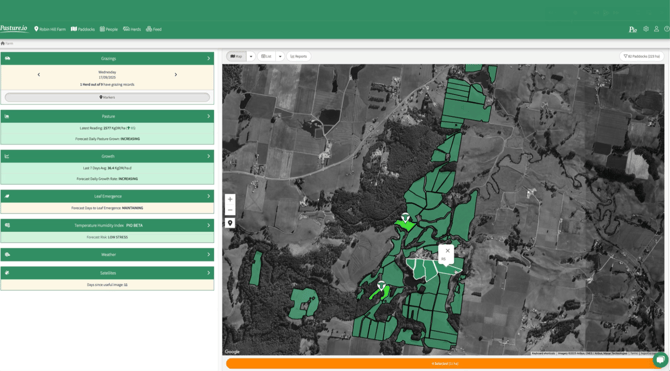
3. **Click** on the blue **Plant Button**
4. The **New Planting** window will open with the select paddock(s) now blue.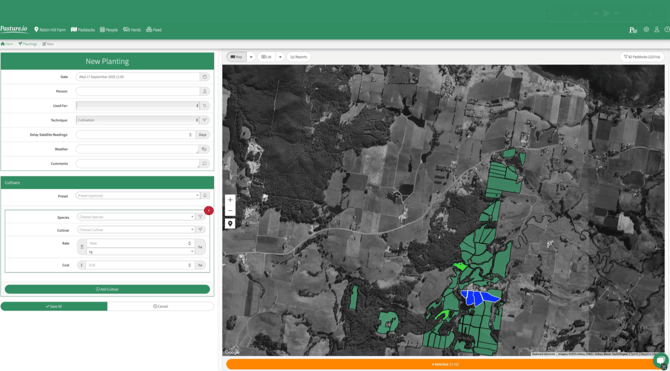
5. **Enter** the details of the new planting activity.
*Tip: The options in the* ***Used For*** *drop down (Forage (other), Forage (pasture), Fodder & Crop) will interact with the feed wedge in different way, learn about this [here.](https://help.pasture.io/paddock-used-for-status-explained?hsLang=en)*
6. **Click** on **Add Cultivar** and enter the cultivar details.
*Tip: To create a* ***cultivar preset,*** *enter the planting details, type a number (e.g. 1, 2, 3), and click* ***Save*** *in the preset box. This will store it as a preset for future use.*
7. **Click** on **Save All** when you are happy with the details you have entered.
8. The next screen will show you a summary of the planting activity that you just saved where you can **Edit**, **Copy**, **Export**, **Delete**.
- [Application Usage](https://help.pasture.io/application-usage?hsLang=en#main-content)
- [Paddock Settings and Details](https://help.pasture.io/application-usage?hsLang=en#paddock-settings-and-details)
- [FAQ](https://help.pasture.io/application-usage?hsLang=en#faq)
- [Farm Dashboard](https://help.pasture.io/application-usage?hsLang=en#farm-dashboard)
- [Grazing Planner](https://help.pasture.io/application-usage?hsLang=en#grazing-planner)
- [Setting up your Farm](https://help.pasture.io/application-usage?hsLang=en#setting-up-your-farm)
- [Mapping](https://help.pasture.io/application-usage?hsLang=en#mapping)
- [Web Browsers and Devices](https://help.pasture.io/application-usage?hsLang=en#web-browsers-and-devices)
- [Privacy, Security & Terms](https://help.pasture.io/privacy-security-terms?hsLang=en#main-content)
- [Policies & Terms](https://help.pasture.io/privacy-security-terms?hsLang=en#policies-terms)
- [Password & Login](https://help.pasture.io/privacy-security-terms?hsLang=en#password-login)
- [Getting Started & FAQ](https://help.pasture.io/getting-started-faq?hsLang=en#main-content)
- [Frequently Asked Questions](https://help.pasture.io/getting-started-faq?hsLang=en#frequently-asked-questions)
- [Manual Pasture Readings](https://help.pasture.io/manual-pasture-readings?hsLang=en#main-content)
- [Manual Pasture Readings](https://help.pasture.io/manual-pasture-readings?hsLang=en#manual-pasture-readings)
- [Plans and Pricing](https://help.pasture.io/plans-and-pricing?hsLang=en)
- [Pasture Readings](https://help.pasture.io/pasture-readings?hsLang=en#main-content)
- [Pasture Readings FAQ](https://help.pasture.io/pasture-readings?hsLang=en#pasture-readings-faq)
- [App Usage](https://help.pasture.io/pasture-readings?hsLang=en#app-usage)
- [Troubleshooting](https://help.pasture.io/pasture-readings?hsLang=en#troubleshooting)
- [V1 (Classic) Help Articles](https://help.pasture.io/v1-classic-help-articles?hsLang=en#main-content)
- [Pasture Readings](https://help.pasture.io/v1-classic-help-articles?hsLang=en#pasture-readings)
- [Paddock Activities](https://help.pasture.io/v1-classic-help-articles?hsLang=en#paddock-activities)
- [App Setup](https://help.pasture.io/v1-classic-help-articles?hsLang=en#app-setup)
- [Grazing Activity](https://help.pasture.io/v1-classic-help-articles?hsLang=en#grazing-activity)
- [Paddocks](https://help.pasture.io/paddocks?hsLang=en#main-content)
- [Harvests](https://help.pasture.io/paddocks?hsLang=en#harvests)
- [Fertilisations](https://help.pasture.io/paddocks?hsLang=en#fertilisations)
- [Paddock Details](https://help.pasture.io/paddocks?hsLang=en#paddock-details)
- [Plantings](https://help.pasture.io/paddocks?hsLang=en#plantings)
- [Spraying](https://help.pasture.io/paddocks?hsLang=en#spraying)
- [Overlay](https://help.pasture.io/paddocks?hsLang=en#overlay)
- [Livestock](https://help.pasture.io/livestock?hsLang=en#main-content)
- [Grazing](https://help.pasture.io/livestock?hsLang=en#grazing)
- [Herds](https://help.pasture.io/livestock?hsLang=en#herds)
- [People](https://help.pasture.io/people?hsLang=en#main-content)
- [Managing Users](https://help.pasture.io/people?hsLang=en#managing-users)
- [Task Manager](https://help.pasture.io/people?hsLang=en#task-manager)
- [Integrations](https://help.pasture.io/integrations?hsLang=en)
- [Feed](https://help.pasture.io/feed?hsLang=en#main-content)
- [Feedstuff](https://help.pasture.io/feed?hsLang=en#feedstuff)
- [Creating a Silo](https://help.pasture.io/feed?hsLang=en#creating-a-silo)
- [Feed Inventory](https://help.pasture.io/feed?hsLang=en#feed-inventory)
- [How to Add Feed and Nutrition to a Grazing](https://help.pasture.io/feed?hsLang=en#how-to-add-feed-and-nutrition-to-a-grazing)
- [How to Create a Detailed Grazing](https://help.pasture.io/feed?hsLang=en#how-to-create-a-detailed-grazing)
[](https://pasture.io)
HQ in Hobart, Tasmania, Australia - servicing farmers worldwide.
[mailto:support@pasture.io](mailto:support@pasture.io)
Copyright © 2025, Pasture.io Pty Ltd