
Not every grazing needs the same level of planning. Choose the option that best matches how you run your farm.
Your post-grazing target is the pasture cover you aim to leave behind after the herd has finished grazing.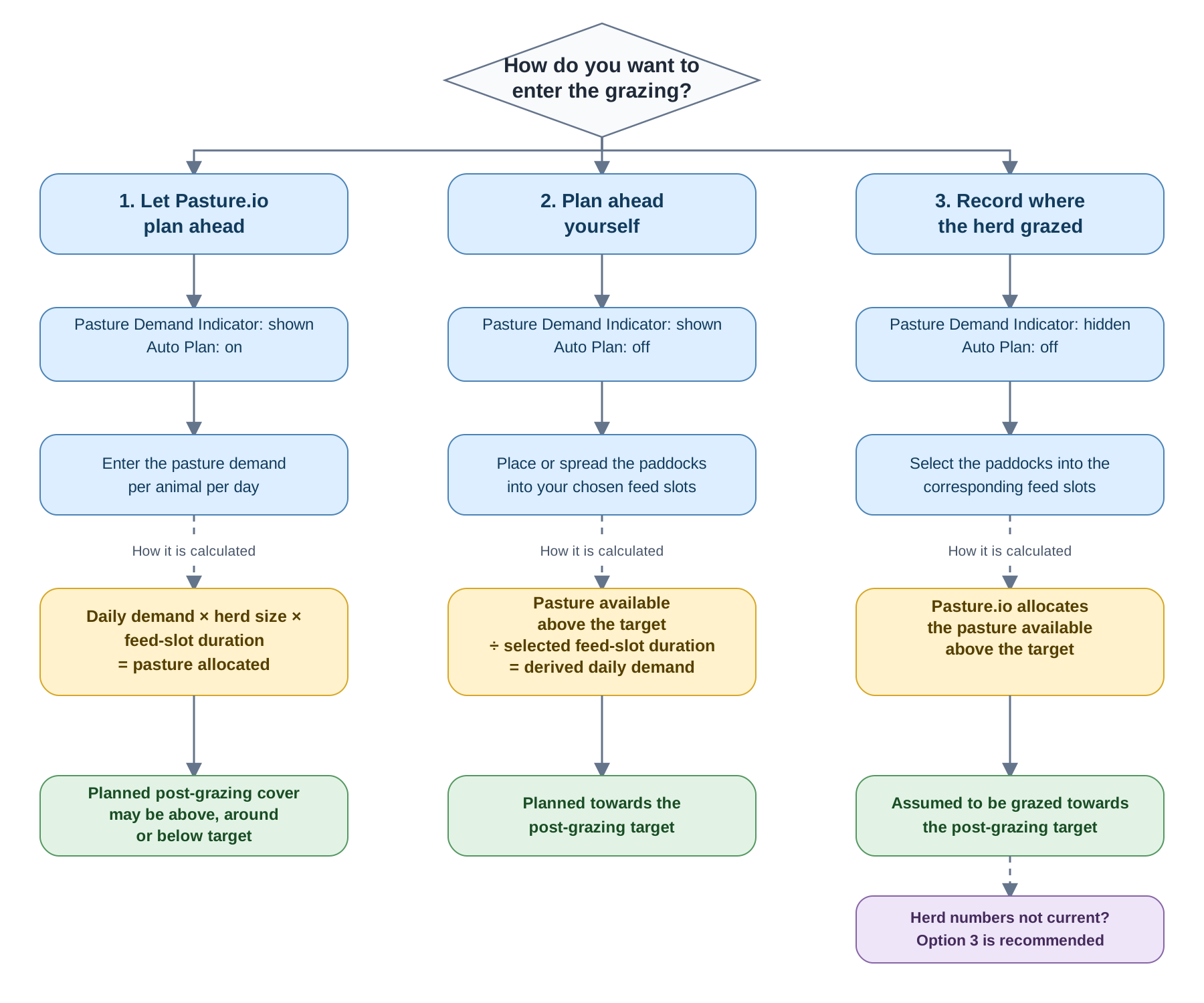
1. Let Pasture.io plan ahead
Keep the Pasture Demand Indicator shown and turn Auto Plan on.
Enter the pasture required per animal per day. Pasture.io uses this, your herd size and feed slots to spread the paddocks across the plan.
Use this when you want Pasture.io to work out the grazing schedule for you. Keep your herd numbers current for the best result.
Depending on the pasture allocated, the planned post-grazing cover may finish above, near or below your target.
2. Plan ahead yourself
Keep the Pasture Demand Indicator shown and turn Auto Plan off.
Place or spread the paddocks into the feed slots yourself. Pasture.io works out the daily demand by dividing the pasture available above your target across those feed slots.
Use this when you know when you want each paddock grazed but still want Pasture.io to plan towards your post-grazing target.
3. Record where the herd grazed
Hide the Pasture Demand Indicator. Auto Plan will turn off.
Select the paddocks in the feed slots where the herd grazed. Pasture.io assumes the pasture available above your post-grazing target was allocated.
Use this for straightforward grazing records, particularly if you do not keep your herd numbers regularly updated.