
If something is not working, the first step is to identify who is best placed to help. In most cases, the issue will be either:
- a FarmPulse / collar issue
- a Pasture.io setup or grazing detection issue
Use the steps below to work out what the problem is and who to contact.
Start here
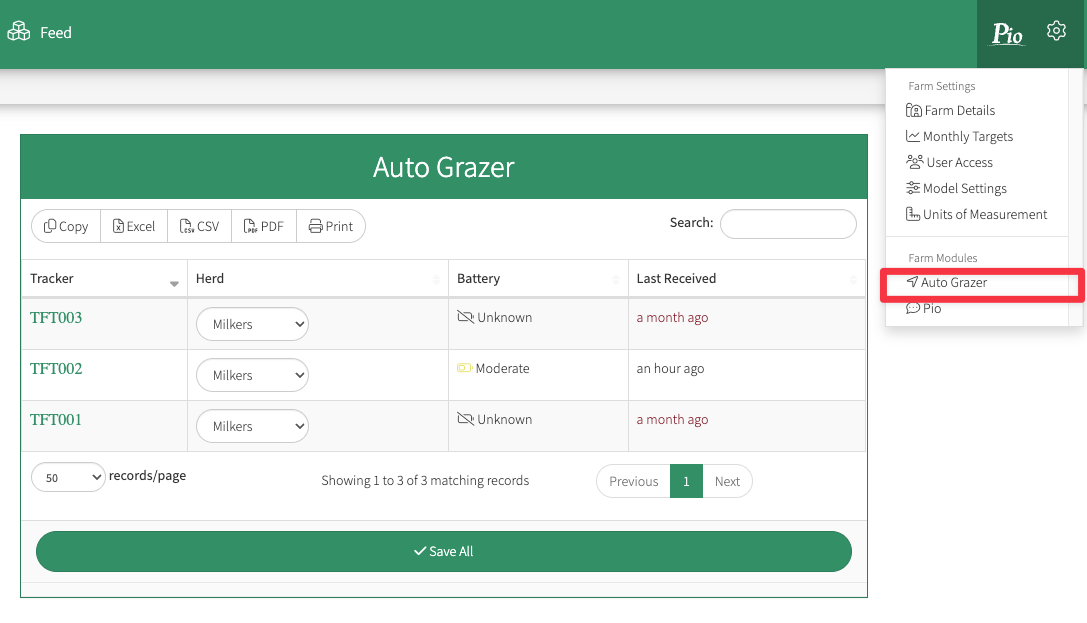
Go to Farm Settings > Auto Grazer and check whether the collars are reporting recent activity.
If the collars are not reporting recent activity
This is most likely a FarmPulse / collar issue.
Signs include:
- Last Received is not from today
- Battery level is low or unknown
If the collars are reporting recent activity
This is most likely a Pasture.io setup or grazing detection issue.
Signs include:
- Last Received is from today or recent
- Battery level is normal
- Collars are active, but grazing is wrong or missing
Check these first
- Check battery levels in Farm Settings > Auto Grazer
- Replace batteries if they are low or unknown
- Use lithium AA batteries only
- Check the tracker is fitted correctly and facing upward toward the sky
- Check the collar is in good physical condition
- Check for poor cellular or GPS reception
- Consider whether extreme temperatures may be affecting battery life
Contact
If the collars are still not reporting after these checks, contact FarmPulse Support: admin@farmpulse.com.au.
Send FarmPulse
- Farm name
- Tracker ID
- Herd number
- Last reporting time
- What you have already checked
Collars are reporting, but grazing is wrong or missing
Likely cause
Pasture.io setup or grazing detection issue
If collar data is coming through, but the wrong paddock is detected or no grazing is recorded, the issue is usually related to how Auto Grazer is interpreting herd movement during the feed slot.
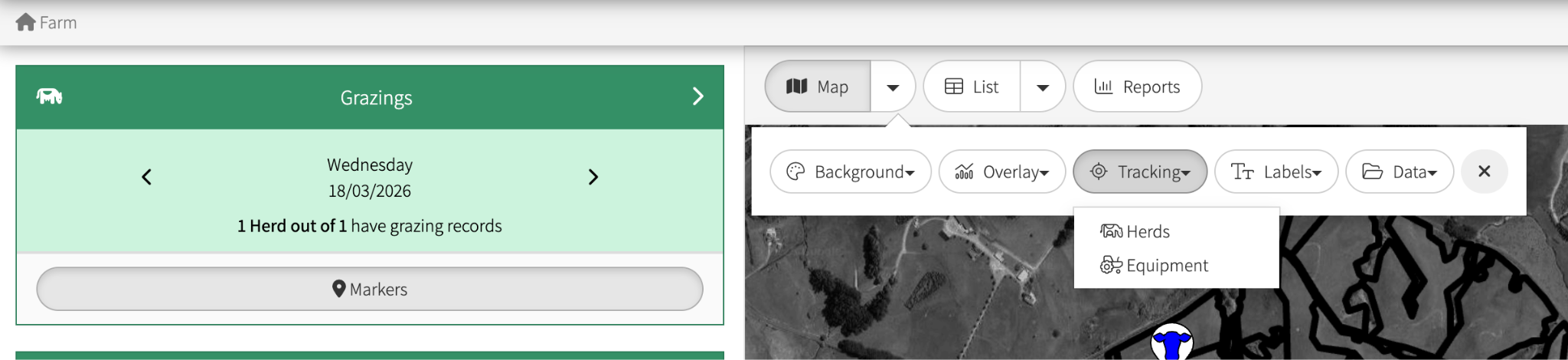
To check what Auto Grazer has recorded, go to Map > Tracking Herds and use the date selector. An icon will appear on the map showing where grazings have been recorded.
Auto Grazer works best when most tracked animals are together in the same paddock during the middle of the feed slot.
Common causes
Trackers are split across multiple locations
This can happen when:
- animals are drafted away for AI, treatment, or checks
- trackers are spread across multiple paddocks
- the herd is not together during the feed slot
Feed slot times do not match actual grazing time
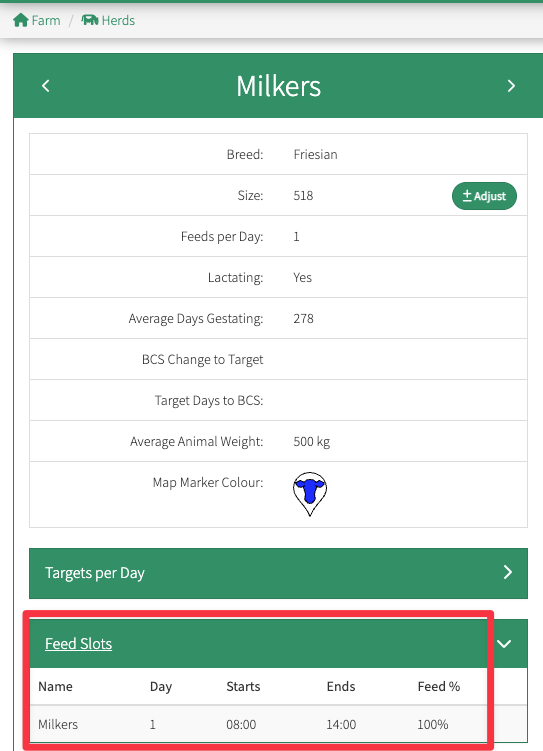
If cows are moving, waiting, or being shifted during the feed slot, grazing may be missed or assigned to the wrong paddock. To check feedslots are correct, go to Herds> “Herd Name” > “Feed Slots”.
Paddock boundaries are inaccurate or overlapping
If paddock boundaries are incorrect in Pasture.io, collar locations may be interpreted incorrectly. This is especially common where paddocks are narrow or close together, such as near the dairy.
Trackers are assigned to the wrong herd
If collars are linked to the wrong herd, detections may not match actual grazing.
Too few trackers, or the wrong animals are wearing them
Trackers should be fitted to cows that usually stay with the main herd.
Guide:
- Milking herd: around 5 trackers
- Dry herd: around 3 trackers
Check these first
- Are the collars reporting recent activity?
- Are the tracked cows usually with the main herd?
- Are feed slot times correct?
- Are paddock boundaries accurate?
- Are the trackers assigned to the correct herd?
- Were animals drafted or split during grazing time?
- Are there enough trackers on representative animals?
Contact
If collars are reporting but grazing is still wrong or missing, contact Pasture.io Support: support@pasture.io.
Send Pasture.io
- Farm name
- Herd name
- Date and approximate time of the issue
- Paddock(s) affected
- Tracker IDs involved
- What happened in real life
- What appeared in Auto Grazer
- Whether animals were drafted or split at the time