
The Long Rotation Model is designed for farms where paddocks regularly go for two months or more without being grazed or harvested.
Before turning it on, make sure you have entered a full round of grazings across the farm. This gives Pasture.io an accurate starting point before paddocks enter a long rotation.
When should I turn it on?
Turn the Long Rotation Model on when:
- Your paddocks may go two months or more without being grazed or harvested.
- You have entered a full round of grazings.
- You intend to keep your grazing and harvest records up to date.
When the model is on, Pasture.io temporarily ignores satellite cover estimates during a long rotation. Instead, it estimates cover using expected pasture growth and your recorded grazing and harvest history.
Do I need to turn it off after the long rotation?
No. You can keep the Long Rotation Model on as long as your grazing and harvest records remain up to date.
You do not need to switch it off when your paddocks return to a shorter rotation. The setting only changes how Pasture.io calculates cover when a paddock has gone two months or more without a recorded grazing or harvest.
When should I turn it off?
Turn the Long Rotation Model off if you have missed many grazing or harvest records and cannot reliably catch them up.
If a paddock was grazed but the grazing was not recorded, Pasture.io may think it has continued growing. This can make the estimated cover appear much higher than the pasture actually is.
If you have missed only a few records and can add them, enter those records and leave the model on.
How to change the setting
Go to Settings  → Model Settings
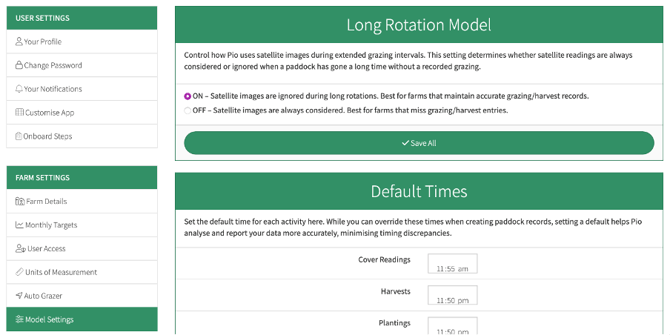
Switch the Long Rotation Model ON or OFF, then tap Save All.
Changes will take effect after the next satellite image is processed.