
Summary
- See an estimated feed wedge for the next 1 to 4 weeks
- Find it under Reports > Scenario Feed Wedge
- Use it before you lock in a rotation or need to explore what-ifs
- Scenarios are estimates and do not save grazing events or selections
What it helps you do
You can explore what-if grazing options without changing your farm history. This is useful when you want to:
- check whether current cover and growth assumptions meet demand
- test how a different grazing priority changes the wedge
- exclude paddocks that are unavailable for a short period
Where to find it in the app
Reports > Scenario Feed Wedge
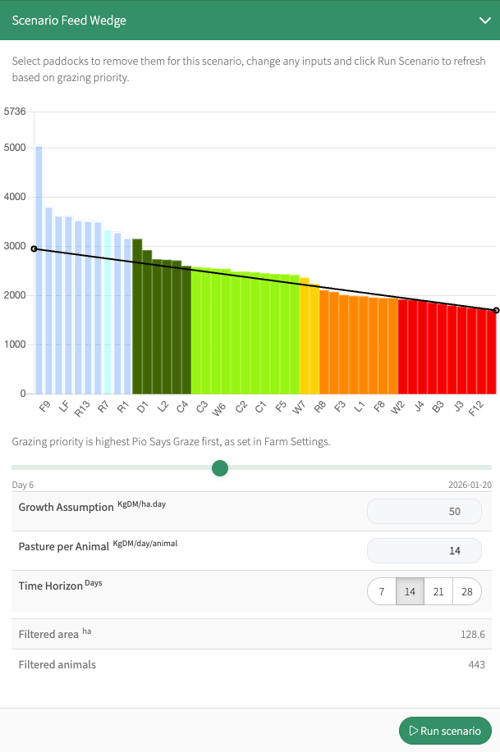
How it works
The scenario uses your current paddock cover, rest days, utilisable area, and monthly targets to simulate growth and grazing over the horizon you choose. It uses your grazing priority (pasture cover, rest days, or Pio Says Graze) and pasture demand defaults as a starting point, then applies any overrides you enter. The results are an estimate and do not write events back to your farm.
How to use it
- Open Reports > Scenario Feed Wedge.
- Set the Time horizon to 7, 14, 21, or 28 days.
- Review or enter values for Growth assumption and Pasture per animal. If you leave them blank, the defaults are used.
- Use the paddock selector to exclude paddocks from the scenario if needed.
- Select Run scenario.
- Use the day slider to preview the wedge across the selected horizon.
This YouTube video will also demonstrate how to use The Scenario Feedwedge Planner
Tips and common gotchas
- If you exclude all paddocks, you will see an info message and no wedge.
- Hold Shift and click multiple paddocks to exclude them, then run the scenario. Tweak exclusions until it looks right, then create a harvest record for those paddocks by clicking on the orange action bar.
- Changes you make in the report are session-only and are not saved for next time.
- Scenario results depend on the growth and residual targets for the current month, so a month boundary can change the output.
- If you have large paddock sets, the scenario may take a moment to run.
Troubleshooting
- I see a pasture deficit warning: The model could not meet demand on at least one day. Review Pasture per animal, the horizon length, or your excluded paddocks, then run again.
- I see a residual breach risk: The model has already hit residual while demand is still unmet. Treat this as an estimate and check whether your residual target is appropriate.
- The wedge sits above or below the target line: The average cover is outside the target line by more than the configured threshold. Consider adjusting demand assumptions or shortening the horizon.
FAQ
- Does this create grazing events or change my farm history? No. Scenario Feed Wedge is a what-if report and does not write events.
- Can I save multiple scenarios? Not in the current version. You can rerun the scenario with different inputs, but the settings are not saved.
- Why does the grazing order look different from the live feed wedge? The scenario uses simulated cover and rest days for each day in the horizon, so the priority order can change as the model progresses.