
From the grazing you have created (INSERT LINK TO CREATE GRAZING ARTICLE) and How to create a Detailed Grazing articles
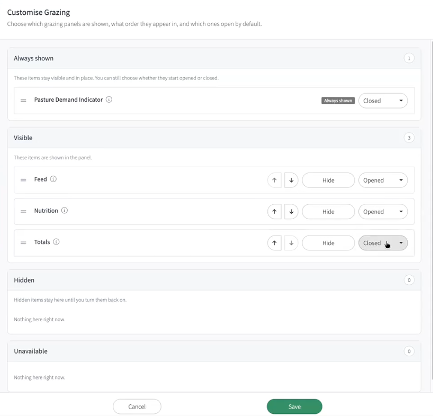
Click on the tab Customize App
You can select to view and open
- Feed
- Nutrition
- Totals
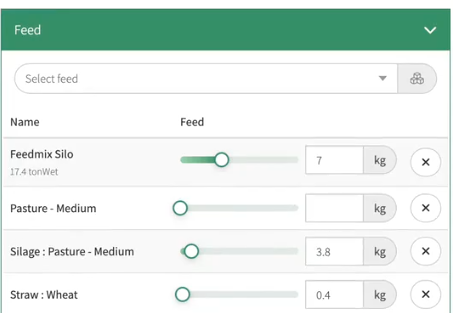
Feed:
-
Select the Feed from your drop down box. These can be selected from your Feedstuff, silos or inventory .
- The sliders allow you to select how many kgs of Feed and Concentrates to provide against both grazings over the day. (The split of feed is set up in the Feed Slot under the Herd’s set up. See Feed Slot and Herd Set Up)
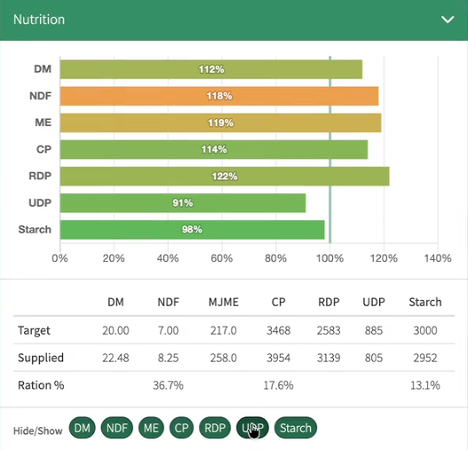
Nutrition:
- Using the slider above allows you to see the Nutritional value of what is being fed in your feed
- A black line indicates the targets of daily nutrients
- At the bottom of the table, there is a Target and a Supplied indicator to assist you with your nutrition decisions
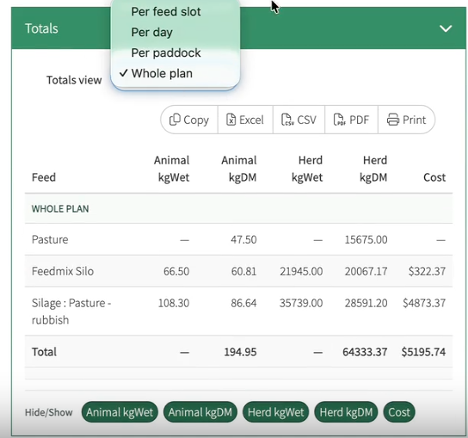
Totals:
These can be viewed
- Per Feed slot
- Per Paddock
- Whole Plan
Information can be viewed to determine
- Animal kgWet
- Animal KgDM
- Herd KgWet
- Herd KgDM
How to create a Detailed Grazing
How the Padlock Works